script async src="//pagead2.googlesyndication.com/pagead/js/adsbygoogle.js"> google.com, pub-0949974396517105, DIRECT, f08c47fec0942fa0

Have You Ever Wanted to Throw Your Computer Out the Window?

“Those parts of the system that you can hit with a hammer are called hardware; those program instructions that you can only curse at are called software.” from Levitating Trains and Kamikaze Genes: Technological Literacy for the Future…. Have you ever wanted to hit your computer with a hammer, bang your head against the keyboard, or just toss it out the window and give up? If you have used a computer for more than a few hours in your life, I’m willing to bet that the odds are good that you’ve felt that way at least once, lol.  Well, I have a solution to share with you – a tip that will totally simply your life, save you from tech headaches, and keep that computer from landing in the front lawn this year. Keep reading to learn about my favorite geek solution….

How to solve computer problems

How to Simplify HOme Computer Maintenance

Obviously, since I work online all day, having a computer that is working as fast and efficiently as possible is an absolute must for me. But even if all you use yours for is stalking ex boyfriends on Facebook – err, I mean, seeing what old high school friends are up to these days – or doing tasks like paying bills, emailing friends, or saving photos – you still want to make sure you’re keeping your tech investment free from viruses, and that’s it’s reliable when you need it. Getting rid of a virus, cleaning up outdated files, doing updates – that stuff can be confusing, time consuming, and often times a big hassle. So what’s a busy momma to do? Well, if you want to simplify all of that stuff, and have your own personal geek on hand, 24 hours a day, in case of an emergency, then what you do is turn to the Geek Squad, at Best Buy!

Deep thought….”How much net work could a network work, if a network could net work?” – Unknown, but funny.

So what is this whole Geek Squad thing all about? Well, while you can use these amazing geniuses at Best Buy at any time for help with a ton of different things, what I’m recommending is the Geek Squad Tech Support Membership. It’s $199 for a year – and yes, I know that might feel a little spendy all at once. But how much would you spend to get your computer fixed if something crashes? What would you spend if you got a virus that you couldn’t remove? {$199 at Best Buy, without this service.} And what’s it worth to you to have someone available to upgrade, update, secure, and clean up your computer when it gets slow and glitchy? {AND – you get this service on up to 3 computers, for the one low price.} The computers do NOT have to be purchased at Best Buy to be able to get this service, but if you are thinking of buying a new computer at Best Buy – you can add on the Geek Squad service for only $99! Now, let me show you more about why it is SO worth it….

What geek squad does

How to get computer help – fast! – when you need it

As you can see – there are TONS of options for what Geek Squad can do for you. It’s so easy to get started – you can read about my very first time using them, when I had them do a basic clean up of my computer. My laptop is pretty new, and I didn’t have any issues with it, but since I had gotten a subscription to the Geek Squad tech support as part of my Best Buy Blogging Ambassadorship, I wanted to see how it all worked. I was AMAZED at how much faster my computer was after the agent cleaned it all up for me!! And I was hooked. So this month, we had them do the same thing to Mike’s computer – {remember I said that one subscription is good on up to three computers?} Want to know what they did for him?

“If at first you don’t succeed; call it version 1.0” – Unknown, but again, super funny…

First of all – Mike’s desktop computer is oooooold. I mean, he’s old too {he turns 36 in a few weeks, and I keep reminding him that that’s almost 40, lol. He hates it. But I’m only 32, which is like, barely 30. So I win…} – and it’s been through a lot, so it’s kind of beat up. But he relies on his almost as much as I do, since he runs a vinyl cutting business on the side {shameless plug – find him at Taboo Designs.} He was pretty skeptical that Geek Squad could really do much for his old beast – But I knew it would amaze him. So, we logged in online, quickly set up a session with an agent – and they took remote control of his computer and got to work for a couple of hours. After we’d used the indoor grill to make dinner, eaten, and then cleaned up – he went back to see what they’d done. He read the messages they left him, and was impressed that they’d found so many things to fix up. Then – the moment of truth… He surfed the web a bit, tried out a few of his programs, printed a few docs, and saved a couple of files. Then – {this is the best part!} – he sheepishly turned to me, and said it was like using a whole new computer.

Ahhhh…. I SO love being right.


Best Buy Geek Squad:

Support for up to three computing or tablet devices.
Available by phone, in store, or online 24/7.
UNLIMITED support during your membership!
Internet security software installed – and unlimited virus & spyware removal at any time {Regular price without Tech Support — $199.99!!}
On-demand access to thousands of how-to videos online -Including step-by-step Windows 8 guides & Photoshop.
Printer set up, hardware installation, password upgrades, and more.
So what are you waiting for ladies?? Learn more, and get your own peace of mind today by getting a Tech Support plan from Geek Squad at Best Buy!

{Disclaimer: I received a complimentary one year subscription to Geek Squad. But, this in no way sways my opinion – you ladies know I’m not influenced by free swag! Lol. I honestly love this, and know you will too! Photo credit: Paul Worthington via photopin cc.}


signature

The Best Gadgets & Apps for Weight Loss – #MillionSteps Challenge

I’ve lost many things over the past year. My patience. My sanity {I’m a work at home mom, with a 2 year old home with me. Eek!} My temper. But one thing that I have NOT lost, is the rest of this baby weight. {Can I still call it baby weight, if she’s now a toddler?} If you’ve been following this blog for a while, you might remember my Nutrisystem diet challenge in early 2012 – I lost over 20 pounds, in just 3 months. I was super excited about that. But over the past few months, with the gloriousness of holiday food, I’ve gained 10 pounds. So, I’ve committed myself to losing it again – My goal is to lose 30 pounds by my birthday in May. We have a pool, and this year I don’t want to hide under a tee shirt all summer! Keep reading to learn about the tools, resources, and motivation I’m using to stay on track….

Fitbit weight loss tools - pedometer, and wifi scale [Read more…]

signature

Cheap Kids Movies on DVD – 14 Family Movies Under $5 Bucks

Looking for cheap kids movies? Well – you’ve come to the right spot, ladies. There is a HUGE selection of cheap kids DVD’s on Amazon right now – I found 14 movies all under $5 bucks each, and I guarantee you that there are more. And these aren’t those weird – “Dora’s Holiday Special from 1999” type of movies. These are good ones. Most are newer, a couple are from my childhood, and all are awesome. And for less than $70 bucks, you could actually buy ALL 14 if you wanted to! Sweet deal, right?

Deal on Horton Hears a Who [Read more…]

signature

How to Create a Gratitude Journal with a Free Memory Jar Printable

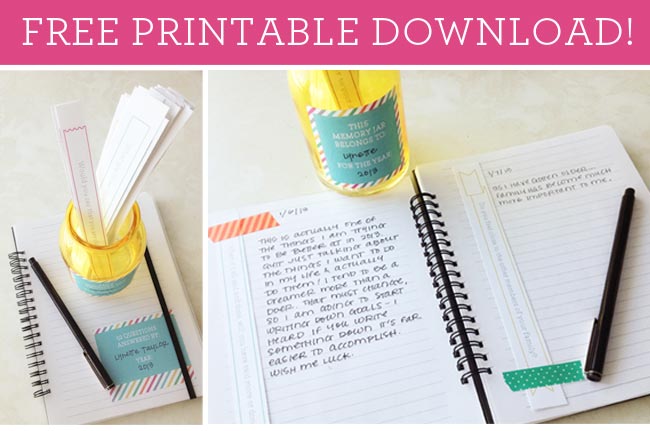
Free Memory Jar Printable… For the new year, I haven’t quite finished writing down, planning for, and deciding on all of my goals. {I’m close though.} But, there are a family goals that I did decide on – I want to build some better routines, so that I’m not so stressed with work and homemaking tasks, and can really live “in the moment” with Abby more often. I want to make sure we celebrate the little things more often. I want to make sure I really and truly show and tell my family how much I love and appreciate them – I want them to feel valued. And, I want to practice gratitude in my life daily. I already tend towards being one of those optimistic, Pollyanna-ish types who always find the silver lining on their glass that’s half full. But I know that I have so much to be grateful for, and want to ensure that I focus my energy and thoughts on that in 2013, versus getting down about any of my challenges.

Gratitude Jar Printable

Free Memory Jar Printable Download from Paper Coterie

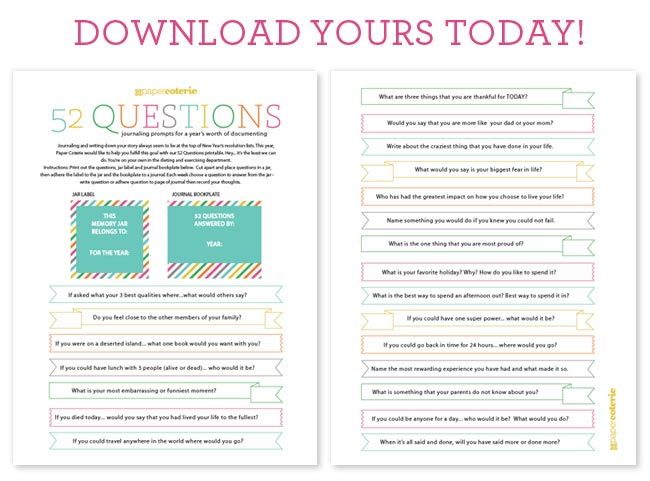
This is such a genius idea – Instead of trying to keep up with a daily journal, scrapbook, or other record-keeping, why not simplify it all, and break it down to a super-doable way of capturing those great moments in your life? Yep, Paper Coterie, my absolute hands-down favorite paper products company, is giving you a free Memory Jar Printable to use this year. How awesome is that, right? They make it so easy to keep your memories alive by recording them for the future. Keep reading to learn how it works…

Journaling gratitude printables

Start your own Gratitude Journal in 2013

Here’s how it works – Print out the prompts, the jar label, and the bookplate. Put all of those prompts into your Gratitude Jar, and then simply pull one out each week, tape to your journal page, {use a cool vintage Paper Tape for some fun style} and then write a little page once a week, using that prompt to guide you. Super easy, and super meaningful.


Paper Coterie

Paper Coterie is a circle of friends who are passionate about documenting the beauty of life well lived. Whether it’s in a photo book, guest book, journal, or one of their custom personalized books, they’ll help you capture the memories you want to save and share. Want to document your growing child? Don’t worry. They’ve got that covered. Choose from one of their awesome personalized growth charts, wall décor posters, baby books, or shower guest books. Want to join Paper Coterie as an affiliate? They rock, and you’ll love learning about the newest products too.


signature

Best Buy New Year Clearance Blow Out

You guys know I’m a total Best Buy girl, right? I was already a huge fan, and relied on the experts there to help me on any of my big {and small} tech purchases. Then I got the opportunity to become a part of the Best Buy Blogging Ambassador for a year, and was as excited as a 14 year old girl at a Justin Bieber concert. {Remember that amazing Bieber Wedding Fever video from last year? Still love that…} Anyway. Right now I have a few Best Buy gift cards to use, and was browsing their site. And check this out ladies –

[Read more…]

signature

You Don’t Have to be a Domestic Goddess to Take Control of Your Life

Doesn’t that feel good to hear? Let me say it again, “You Don’t Have to be a Domestic Goddess to Take Control of Your Life.” And it’s not me saying that – it’s the crazy-smart experts over at Modern Parents, Messy Kids. This is one of my absolute favorite sites -so full of creatively genius ideas for simplifying life, while keeping it fun. And now, she has a super awesome new ebook. I bought it yesterday, and love it so much I wanted to share it with you guys!

Project Organize Your Entire Life - ebook [Read more…]

signature

Bloggertunities: Opportunities for Women Bloggers to #RockYourBlog2013

Grow your blog – Monetize, find new leads and blogging opportunities, and get the best tips too… Hi all! Welcome to another weekly Bloggertunities post, a round-up of the best blogging tips, tools, leads, opps, and events of the week. I hope you’ll find some helpful stuff – and if you do, be sure to share it! And if you have something awesome to share – event sign ups, linkys, tips posts, etc – post ’em in the comments! I do my best to tweet those links out all week too.

Blogging opportunities list for women bloggers [Read more…]

signature