script async src="//pagead2.googlesyndication.com/pagead/js/adsbygoogle.js"> google.com, pub-0949974396517105, DIRECT, f08c47fec0942fa0

How this service can help organize your life online

How to get organized, for moms

Organize Yourself Online is a comprehensive service designed to make it easier than ever for you to get yourself organized

Your personalized program offers unique tools and ideas to organize yourself when and where you need it most – right at your PC desktop.

What You’ll Get with this Program

This service is packed full of great tips, ideas, tools and helpful resources to help you finally get organized – and stay that way!

  1. Get updated information on organizing techniques that really work.
  2. Track daily progress toward your personal goals.
  3. Get support from others in the exclusive community discussions.
  4. Review your new skills with customized quizzes.
  5. Develop organizing strategies with your personal journal.
  6. Answer your toughest questions with access to the experts.

You’ll also get a FREE copy of their book, Discover 28 ways to avoid procrastinating filled with quick tips to help you get in gear, and get motivated to move forward towards your goals!

Do you need help getting your life organized?

This resource has helpful information sections to address all of the areas that busy moms need help with, including:

  • Office
  • Household
  • Children
  • Managing Time
  • Financial Records

The past year has been a whirlwind for me – Having a baby, moving to a bigger new home that needs a lot of work, having family move in with me, starting a blog and other online businesses – and I’m realizing that I need to bump all of my organization methods up to a new level. When you have so much to do, and juggle so many different roles and responsibilities, you have to have awesome organization systems or you just can’t keep up with it all. Being organized keeps can help you feel SO much less stressed – You know where things are, and how to find them. You know you’re keeping the right records and information on file. You know what tasks need to be accomplished each day, so you never miss a deadline.

If this all sounds great to you – Check out OrganizeYourself.com today!

And, for more great tips – Check out more of my Busy Mom Solution resources:

signature

Finding Balance in the Mom Life #InspireGaiamTV


“Problems arise in that one has to find a balance between what people need from you and what you need for yourself.” – Jessye Norman

This quote describes motherhood perfectly. When we become moms, suddenly there is out own heart out there, walking around in the world. Infants are so tiny and need so much care, there really isn’t much choice whether we put off our own needs for awhile, to give them the 24 hour care that they need. It seems like we have a hard time realizing that we can let go a little bit as they get bigger. You seldom hear men talk about not getting enough “me” time, right? So why do we have such a tough time realizing that while ensuring that our kids are safe, healthy, and happy is indeed our goals as moms – we still need to remember that we’re a person too! You’re not just a mom, your a chick who needs a life too.

Motivational quotes

“Balance your thoughts with action. If you spend too much time thinking about a thing, you’ll never get it done.” – Bruce Lee

You’re tired. You’re grumpy. You’re just totally lacking motivation. You feel like you’re always running a little behind – but don’t know how to catch up. You’re not enjoying yourself each day – but you’re too busy to slow down and figure out how to enjoy things. Any of that sound familiar? If so – You, my friend, are unbalanced. But as always, I’ve found another “Busy Mom Solution” to help! Let me introduce Gaiam TV!

“Happiness is not a matter of intensity but of balance, order, rhythm and harmony.” – Thomas Merton

Gaiam is a company that totally understand this challenge – and is focused on helping you become balanced again. From their amazing work out videos {their maternity yoga videos were my very favorite, even after Abby was born} – to their inspirational documentaries, they are all about motivating you to think positively, finding easy solutions for healthy living, and sharing ways to renew your spirit. Pretty much, they’re like that one totally amazing girlfriend who always knows the right thing to say to keep you moving on a positive path in life.

What Inspires Me: No matter what they say, you can’t ever really do it all. But you can do it better. So my motivational motto is “Do your best, and forget the rest!”

They’ve always offered amazing videos and tools for wellness – and now they’ve put together a whole online television channel, devoted to YOU!

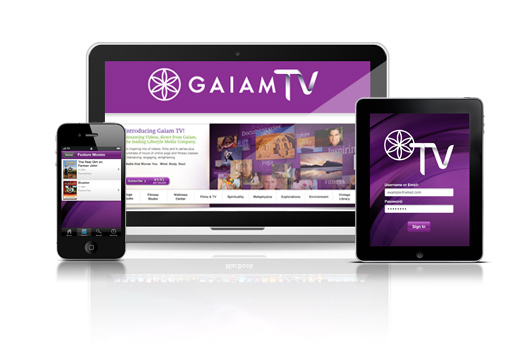
Gaiam TV, online television

What Will You Find on Gaiam TV?

You’ll find so many things to get you rockin’ a balanced life again  – from Inspirational Movies to booty-shakin’ workout videos, there’s something for every mom, every lifestyle, and every need.

Try Gaiam TV for FREE! Sign up for a 10-day, totally free trial today!

Gaiam TV streams to you anywhere – on your laptop, iPad, or smartphone. No more buying new workout videos all the time – just try a new one whenever your in the mood, at the touch of a button. There are no commercials, you can watch as much as you want with no limits, and there is no way you won’t see a difference in your life after bringing Gaiam TV into it!

Want to WIN your own awesome subscription? I’m giving one of you lucky readers a full 3-month free subsciption – Enter here today! {Until 3/9/2012}

{Disclosure: This promotional sponsored post was made possible by Mom Spark Media. Thoughts are my own. All prizing for MSM giveaways is handled by a third party unless otherwise noted. For this reason, prize fulfillment can take up to 90 days after the winners information is received.}

signature

Use This Tool to Never Wait on Hold Again! #Digitwirl

Digitwirl, Never wait on hold, tech made simple

“I try to take one day at a time,  but sometimes several days attack me at once.” – Jennifer Unlimited

We’re all super busy moms, right? Which is why you read this site, for new Busy Mom Solutions each day! I know that one of my biggest pet peeves ever is having to wait on hold – There I am, kids running around wild, someone asking for a snack, diapers needing changed, and dishes needing washing – trying to hold a phone to my ear for 15 minutes, waiting for someone to get on the line! Ack – Super frustration! But, you’re in luck – Digitwirl has a great new video to save the day! Read more about this new app that can save you loads of time….

This Week’s Twirl – Fast Customer!

Calling customer service usually involves a kink in my shoulder, bad jazz flute music, and lots of waiting. I’ve decided that I’ve got better things to do, and thankfully, so has Fast Customer.  This brilliant app (available for iOS and Android), lets you choose from a list of over 3,000 customer service numbers.  Find the company you want to speak to, and request a callback with one button— then put your phone down and get on with your day… Fast Customer calls you back when there’s a real live human on the line.  If you like being reminded that “your call is important to us,” and being asked to “press 1 for english,” then you won’t like this app.  For the rest of you… it’s the ultimate time-saver.

What do you think?

Um, pretty amazing, right? This app helps make your smart phone even smarter, and definitely is a must-have tool for busy moms everywhere! I’m always on the look out for tips, products, sites, and services that can help me simplify my busy life, manage my mom life more efficiently, and have time for a little bit more fun – And Smart Customer is a perfect addition to my day. If you’re using it – Leave a comment and let me know what you think of it! And be sure to share any other favorite tools too, so we can all check out your best tips!

Find more great ideas on my Tech Made Simple and Smart Solutions boards on Pinterest!

Digitwirl.com – Perfect for Busy Moms like Us!

Carley KnoblochDigitwirl is the weekly web show that offers simple solutions to modern day problems. In 3 minutes, Digitwirl brings busy women the very best time, money, and sanity-saving technology, and then teaches them how to use it, step-by-step. Digitwirl was created by technology lifestyle expert Carley Knobloch, who uses lots of technology to manage her busy life as mom of two and entrepreneur. Become a subscriber to get weekly show alerts and exclusive deals at Digitwirl.com, or follow Digitwirl on Twitter at @digitwirl.

signature

Largest Online Protest in History: Why SOPA & PIPA Matter to You

Web Blackout SOPA and PIPA

Want to know why some of your favorite websites suddenly went black?

If you haven’t heard of SOPA or PIPA yet, I’m really not all that surprised. Mainstream media has done a great job of keeping this issue out of sight, and many people have no idea that the freedom that they now enjoy when using the internet is seriously threatened by these two bills that our government has been putting together to “protect us”. That’s why some of your favorite sites will be blacked out today – to make you aware of what’s going on, before it’s too late.

SOPA, PIPA, WTH?

Confused already? SOPA stands for the Stop Online Piracy Act, and PIPA stands for Protect Intellectual Property Act. Those sound like good things right? The problem is, the names of these bills are quite deceiving. What these bills will do is give anyone the right to shut down any website at any time. Seriously. And they would make many of us criminals.

Why this Matters to You

SOPA would give the Department of Justice the authority to shut down any website that hosts copyrighted material – Meaning, not just those sites you go to when you want to illegally download movies or music. Sites like eBay, Craigslist, Wikipeida, and my beloved Pinterest could be shut down simply because their USERS uploaded material that they didn’t own. Right now those sites are protected by “Safe Harbor” laws – but if SOPA were to pass, those sites could be deemed “enablers”, and have their entire website shut down. And there is almost nothing that a site owner can do once this happens to them.

This is Serious Stuff

There are a lot of theories about the motives behind this – But most people agree that if either of these bills were to pass, it will lead to a major censorship of the internet. Sites like Facebook won’t want to risk being shut down – so instead, they’ll have to censor their users strongly to ensure that they are in compliance with the new bills. And I don’t know about you – But I do NOT like being censored.

Who is Protesting?

This is such an incredibly big threat to the internet that we know now, that website owners are going so far as to black out their sites as a show of protest. Who is blacked out? Well, if you haven’t already noticed them, here are a few:

  • Google.com – You’ll see the black bar over their logo.
  • Wikipedia – Directs you to contact info for your representatives.
  • Craigslist – Black site, with a SOPA opposition message.
  • Reddit.com – Goes down in a few hours, you can read more on their site.
  • Mozilla.com – Goes black at 8am Eastern Time, read more.

Visit SOPAStrike.com to learn what other sites are protesting, how you can join the protest by blacking out your own site for 12 hours, how to join the movement on Twitter, and more.

Wasn’t the vote canceled?

Yes, due to the growing pressure from so many influential people on the web, they’ve temporarily delayed the vote on SOPA. But PIPA is still on track to be voted on, and SOPA is far from defeated. If you want to learn more about these bills, these sites explain it all much better than I can:

If you aren’t feeling angry, frustrated, disgusted, or a wee bit scared after reading all of those – then you didn’t read them right. JK – but seriously. I debated joining this strike, since I am EXTREMELY opposed to these bills. But – I have sponsors and media partners that I have obligations with, and since I couldn’t reach agreements with all of them on going black for a day, I’ll be staying live. I hope to black out my site for at least part of the day, this afternoon. But I wanted to do my part to spread the word about this – and encourage YOU to take action. Whether it’s writing to your congressman or simply sending out a tweet. Visit SOPASTIKE.com for more info.

What do YOU think?

Share your thoughts on SOPA and PIPA in the comments…. If you disagree with someone, be respectful. Discussion is encouraged, disrespect is not. But I would love to hear your views on this…

signature

Free Guide: Using Genesis on WordPress for Absolute Beginners

Using Genesis on WordPress - Free ebook

“Try to learn something about everything and everything about something.” – Thomas Huxley

Are you using WordPress, and could use some help figuring it all out? Or maybe you’re just thinking about making the switch from Blogger – and want to learn more to get prepared. WordPress is not difficult, but it can be overwhelming when you first get started.

This new, amazingly helpful – and totally free! – ebook from Copyblogger will make you feel like a total blogging rock star.

This book is targeted towards bloggers who use the Genesis framework on their WordPress site, which is what I use. But – I started out on a basic free WordPress theme, and this book will be helpful to you too if that’s what you’re using – trust me. It works great as a guide to understanding basic WordPress features – since many of them are the same on a basic WordPress site as they are on Genesis.

Learn more and download the FREE guide for Using Genesis on WordPress from Copyblogger today!

UPromise

signature

4 Easy Steps to Saving Family Memories

iMemories

“Memory is a way of holding onto the things you love, the things you are, the things you never want to lose.” – From the television show The Wonder Years

You already know I’m a big photo junkie. I’m the person in the family that collects our pictures, videos, and keepsakes – I make scrapbooks and photo books, personalized cards, and other fun projects to preserve those great memories. We have a ton of old VHS tapes, of Christmas and other holidays from when I was a kid. They’re starting to show their age – {so am I, so it’s not surprising… Lol} – and I’ve been trying to find an option to upgrade them. This week I found one, and am excited to share it with you guys – This is totally a Smart Solution – check out iMemories.com!

Old tapes converted to new dvd


“We do not remember days; we remember moments.” – Cesare Pavese

Did you know that it only takes 10 years for your old home movies on video to start fading? Ours are a little over 20 years old, and are getting pretty rough in spots. And it would be kind of devastating to lose those memories! iMemories is like your own Super Hero – they have a “Digital Mastering Technology” that they use to digitize your videos by hand, to preserve those memories, so they can be enjoyed by the next generation of your family. Awesome, right?

Here’s how it works:

  1. Gather up all of the movie films, videos and photos that you want to save. Then head to iMemories.com, and set up an easy peasy FREE account.
  2. After you enter your name and email, it’ll give you options to choose how you’d like to send in your products – for now, just click the FREE, “I’ll send them in my own box” option, and print a label for later.
  3. Now, you have an account! Simple, right? You can get a quote from them after they receive your box, with options on what you can create!
  4. Place your order – it’s easier than I had expected. Then enjoy totally amazing, custom made DVD’s of your favorite old home movies and pictures. These would make awesome gifts for your family this year too!

iMemories will convert and preserve all your aging home movie films, camcorder videotapes, slides and photos from any past decade into a crystal clear modern digital format. Only $9.99 per videotape or 50 ft. film reel and $.49 per photo to digitize + $9.99 per DVD.

Browse around the site and check out the cool features. I’m a big fan of the iMemories Studio – Once you set up an account, you can use this to organize, edit, and label your home movies and pictures as well as create custom DVD’s with your own media. Plus – it’s super simple to use!

What do you think?

Do you have old family movies that you’d like to get onto DVD’s too? What do you do to preserve your family memories? If you’ve ever used iMemories, leave some comments with your tips, creative ideas, and experience here to help other readers!

Let’s be Friends – I’d Love to Connect with you!  – Join me on Facebook!

signature

10 Blogging Goals for 2012 – Starting with “Be More Awesome”

New Years Resolution Quote

My 10 Blogging Goals for 2012

1. Be More Awesome! Yep, that’s right. This year is all about simplifying – in life, in work, in relationships, in my daily chores, everything. If it makes me smile – then I need to find ways to add more of it to my days. If it only causes me stress, then I need to figure out ways to fix it, get rid of it, or just let it go. I’m going to fill each day with awesome. This year is going to be a rock star year for me, I can just feel it….

2. I Love Social Media. It’s true. I am a total social media junkie. And this year has brought NEW social media sites for me to get hooked on. I’m now totally addicted to Pinterest – I’ve lost count of the hours I’ve lost there. And I’m starting to kind of get into this whole Google+ thing too. So – my social media goals this year: 10,000 fans on Facebook and Twitter by the end of March. Reaching that goal would be a pretty cool way to celebrate my one year anniversary of my blog, right?

3. Attend my first blogging conference! This one is pretty easy, since I was recently invited to speak at Reviewers Retreat this summer!! Woo – Super exciting! It’s in North Carolina, and I’m in Washington State – so that’s a lot of travel. I’m hoping to find a sponsor to partner with for this event, as well as for BlogHer, which I’ll be attending in August. But I want to make sure if I partner with someone, it’s a good match, and we can both bring each other huge benefits, so I’m still planning….

4. Get new business cards. This may sound boring – and that’s the point! So many business cards are boring as can be. I want to put together a new set of SUPER cool cards. If that’s my first connection with someone, I want it to let them know that I’m anything BUT ordinary! {Have you seen the amazingly creative business card ideas at Moo.com?}

5. Connect locally. I had the chance to partner with a couple of local business owners this summer, and loved it. Most of my blog readers are from out of the area, but I’m going to work on connecting more with moms in my local community. I’m hoping that I can meet some great local women to promote this year!

6. More “real life” promotion. While I LOVE what I do online, and am amazed at the way my posts can reach across the country – and sometimes even farther! – I’m excited to come up with some new ways to promote the brands I work with offline too. I’ve got a few ideas I’m cookin’ up – but I’d LOVE to hear your ideas too. {Which is my way of saying – Leave me a comment with some advice! Lol}

7. Get more organized. Last year was a total whirlwind, and I’m still trying to catch my breath. I’m going to start menu planning to make more time in the evenings. I set up a new account at Manilla to help me organize my household accounts. Email can be crazy – so I’m using OIB to sort it for me. I’ve finally figured out a system for a blogging binder that works perfect for me. Hopefully getting some good systems in place will help me feel less overworked and overwhelmed!

8. Learn SEO skills. I’m incredibly tech-challenged. My brother was helping me with a project the other day, and asked me how many pixels of padding I wanted on the image. I said – I don’t care how many pixies you use, just get it done. He replied – “And your the successful website owner, while I’M the web designer who can’t find a job….” Lol. I’m amazed every day at what I’ve learned – But my next big goal is to get better at Search Engine Optimization. I bought a book. So that’s a start :)

9. Media Kit. I need to make a new one. One I actually like. I may need to hire someone for this. If you have a good suggestion, I’d love to hear it – Leave me a link in the comments!

10. Time Management. I tend to be a bit of a perfectionist. And I have more enthusiasm and ideas then I do time. These combined mean that I sit at this computer WAY more than I should. I told you how I struggle with housekeeping routines, even though I’m a total clean freak. And I want to make more time to take Abby fun places around town. So I’m going to really work on sticking to a time limit on how many hours I spend online. {That doesn’t count my iPhone though… Words with Friends anyone?}

What are YOUR goals for 2012?

signature