script async src="//pagead2.googlesyndication.com/pagead/js/adsbygoogle.js"> google.com, pub-0949974396517105, DIRECT, f08c47fec0942fa0

Busy Mom Solution: Forgot to Get a Gift? Fix it in Seconds!

Gift Cards sent digitally

No matter how organized you may be, everyone’s had that “Whoops! I forgot to get my (fill-in-the-blank) a gift!” Whether it’s the holidays, someone’s birthday or a baby shower, no one likes being empty handed and under the gun.

Giftzip.com

Which is why we suggest Giftzip.com–a site that features hundreds of e-gift cards from Amazon to Zappos. Select the card and then Giftzip zips you right to the gift card section of that merchant’s website where you choose the amount and delivery method.

A super helpful app!

And speaking of cards, it doesn’t get easier than the RedStamp app. Free customized e-cards for every occasion that you can send straight from your iPhone, iTouch or iPad via email, text, or even high-quality postcards.

Check out this Twirl to see how quick and easy sending last-minute gifts can be…..

What do you think?

I signed up for this app before I was even done watching the video, lol. Totally amazing, and oh-so-super helpful! There are SO many times that I’ve forgotten a friends birthday until I see it in my Facebook reminders – {oops!!} – But with this totally user-friendly and very fun app, I can “send” them a personalized card instantly, and they’re so cool, no one will ever have to know I forgot. {You won’t tell, right?} And how amazing is the ability to send out a gift card directly to the recipients cell phone? Now that is a great way to surprise the hard-to-impress teens in your life. As busy moms, it can be tough juggling all of the demands of your hectic days – which means birthdays, anniversaries, and other special events can slip your mind. Thank goodness the totally awesome ladies at Digitwirl are here to bring you new tips each week that seriously save the day!

Digitwirl is the weekly web show that offers simple solutions to modern day problems. In 3 minutes, Digitwirl brings busy women the very best time, money, and sanity-saving technology, and then teaches them how to use it, step-by-step. Digitwirl was created by technology lifestyle expert Carley Knobloch, who uses lots of technology to manage her busy life as mom of two and entrepreneur.

Become a subscriber to get weekly show alerts and exclusive deals at Digitwirl.com, or follow Digitwirl on Twitter at @digitwirl.

signature

New Video Finally Clarifies Facebook Giveaway Rules

Facebook Logo

Confused by Facebook Giveaway Guidelines?

Many people are. To me, the rules that can be found on their site – Facebook Giveaway Guidelines – are pretty easy to understand, even though they’re not written as clearly as they probably should be. But, many people disagreed with my interpretation of them, and there has been a lot of discussion {and sometimes argument} the past few months, especially among bloggers, as to what exactly they could and couldn’t do on Facebook to promote their giveaways. So, I’m really excited to share this great video that does a great job of clearing things up. {Hint: I was right, lol.}

Comply with the Promotions Guidelines on Facebook Video

The Basics

Here is the basic idea that you need to know to be able to play by the rules – You CAN condition an entry on someone taking an action. That means you can say, “Only people who have ‘Liked’ my page can enter.” But, you CANNOT use Facebook functionality as a way to enter your giveaway. That means you CAN’T say, “Like my page and be entered to win!”

What is Facebook Functionality?

When they use this term, they mean anything that’s built in to Facebook – such as the Like button or commenting. If you use those as entry methods, it’s kind of like you’re using Facebook as an entry form. So, you have to use a separate entry form – Rafflecopter, Google Doc, Comment on blog – whatever you want. But using a button on Facebook cannot be the way that they get entered – they have to use YOUR entry form or method.

Final Answer

So, YES! You can have people “Like” your page as an entry method – as long as you have them do something other than that as the actual entry method. Using the “Like” button to enter – Not ok. Liking your page then filling out a form – That is ok! I hope that this helps clear up some of the confusion – Giveaways that include people “Liking” your page can be a great way to meet new faces on your Facebook page, so I hope that this clarification helps you to feel confident in adding it your entry forms again!

Questions?

If you still have questions – please leave a comment, and I’ll try my best to answer them for you!

signature

Don’t Let Your Digital Memories Become Distant Memories


“A good snapshot stops a moment from running away.” Eudora Welty

Photographs are important to me. I had a few concussions when I was in my early 20’s {long stories, for another day…} and my memory just isn’t as strong as it used to be, or should be. But photographs help me really hang on to those special moments in life – silly faces, baby toes and fingers, fancy occasions when we’re all actually cleaned up and dressed up – I love looking back at the photos that capture our lives.

“You don’t take a photograph. You ask, quietly, to borrow it.” – Author Unknown

If you love photographs like I do, you’ve probably got a TON of them saved on your computer too. I worry sometimes – what if something happens to my computer? What would I do if I lost all of my photos? That would be devastating, seriously. I’ve got thousands of photos saved in this thing. That’s where Sandisk comes to the rescue – “The SanDisk Memory Vault is a photo album for the digital age that allows consumers to preserve images in one reliable location.” What is it? Well, it’s a little gadget that hooks up to your computer with a USB cable, and safely stores every single one of those precious photos for up to 100 years!

Most Consumers Would Not Destroy Their Family Photos for One Million Dollars

SanDisk also issued results from an online survey conducted on its behalf by Harris Interactive from July 28-August 1, 2011 among 2,294 U.S. adults aged 18 and older2. The survey found that 79 percent of U.S. adults with digital photos plan on passing them down to future generations. Photos are so precious that 64 percent of U.S. adults would not consider destroying their family photo collection for any amount of money, not even for one million dollars.

“If you see something that moves you, and then snap it, you keep a moment.” – Linda McCartney

Sandisk makes a ton of my favorite products – you can see a few more of them in this great Holiday Gift Guide video. And like they mention in the video – the Sandisk Memory Vault is super easy to use, and you can store your photos AND videos! So someday you can hand down videos of your wedding day, adorable baby photos of the kids, videos of first steps, family reunions, and more – all safely preserved in one durable device. What more could you ask for, right?

Which of my photographs is my favorite? The one I’m going to take tomorrow. – Imogen Cunningham

To preserve all of your yesterdays and tomorrows – Head to the Sandisk site to learn more about how the Memory Vault safely preserves your family photos for up to 100 years, for the next generation of your family to enjoy.

Buy the Memory Vault today on Amazon – Get the SanDisk Memory Vault 8 GB
for $49.99, or if you have loads of photos like me, upgrade to the SanDisk Memory Vault 16 GB for $89.99 – both with FREE shipping.

{Disclaimer: I wrote this review while participating in a campaign by Mom Central Consulting on behalf of SanDisk and received a product sample to facilitate my review, and coupons to giveaway.}

signature

Tech the Halls! Great Gadget Gifts for Every Budget #digitwirl

“Any sufficiently advanced technology is indistinguishable from magic.” – Arthur C. Clarke

I’m surprisingly tech-challenged for a blogger – You’d think that since I spend my whole days on this darn computer – I create posts filled with links and graphics and codes. I’m a master of social media with accounts on Facebook, Twitter, Tumblr, Pinterest, YouTube, LinkedIn and more. I run campaigns for great companies, build brand awareness with product ambassadorships, run successful giveaways, and promote great businesswomen in my Directory. Yet still – technology can be a challenge for me. That’s why I love Digitwirl!!

Digitwirl Rocks My Socks!

The amazing ladies at Digitwirl search out the VERY best techy gadgets, services, and websites with one goal in mind – to make YOUR life easier! Their weekly Twirls explain things in a way that even I can “get” it – which makes me feel just that little bit smarter and more tech-savvy.  This year they’ve put together the coolest collection of totally fun items for everyone on your list – from foodie to photographer, you’ll find the perfect gifts at every price point. What are you waiting for? Check it out…

“The technologies which have had the most profound effects on human life are usually simple.” – Freeman Dyson

Digitwirl says: ” Ready, set, shop! The holidays are upon us and it’s time to get in gear and start finding the perfect gift for everyone on your list. No pressure, right? Well, don’t stress, Twirlers— if there’s one thing we know for sure here at Digitwirl, it’s that tech can help make anyone’s spirit a little brighter!” – They’ve scoured scoured the tech universe to find you the best gift options for everyone you have to shop for. I love that all of the items they include are so innovative – and they’re all perfect “Busy Mom Solutions!!” Love it. If you saw some great gifts for the amazing people on your list – you can learn more about each product and how to buy them on the Digitwirl site. Here are a few of my very favorite picks –

My Favorite Digitwirl Picks:

_________________________

  • The Nintendo DSi – I looove this! I would never have even guessed that this kids gadget had great games for grown-up girls! And here’s the fun cooking game they showed you: America’s Test Kitchen: Let’s Get Cooking.
  • Belkin Kitchen Stand and Wand for Tablets– I don’t have a tablet yet, but myohmy, this is SUCH a great idea! You know I’m all about finding great products that are “Busy Mom Solutions” – things that make you think, “Why didn’t I know about this??!! What a simple solution!” And that’s exactly what this is.
  • Samsung Laptop – Boyohboy – you guys KNOW I am in need of a laptop!! I work so much, and it would be amazing to be able to bring my work with me, instead of being stuck here at my desktop. I’ve been trying to decide on a good one, so that when my budget has some room I can finally get one – And if the Digitwirl gals give this their seal of approval, then I’m sure I’ll love it!
  • Nikon Digital Camera System – This is uh-MAY-zing! I love it in white – super chic and modern. I got a new camera last year, and while it’s doing a great job, it’s just a basic, solid, camera. I miss when I used to take photography classes in school – I’d love to have a really great camera like this again for my photography. Totally cool.
_________________________

“Technology has a great advantage in that we are capable of creating dinosaurs and showing them on the screen even though they are extinct 65 million years. All of a sudden, we have a fantastic tool that is as good as dreams are.” – Werner Herzog

Digitwirl is the weekly web show that offers simple solutions to modern day problems. In 3 minutes, Digitwirl brings busy women the very best time, money, and sanity-saving technology, and then teaches them how to use it, step-by-step. Digitwirl was created by technology lifestyle expert Carley Knobloch, who uses lots of technology to manage her busy life as mom of two and entrepreneur. Become a subscriber to get weekly show alerts and exclusive deals at Digitwirl.com, or follow Digitwirl on Twitter at @digitwirl.

signature

{Digitwirl} How To: Get the Best Deals Online – Watch and Learn!

Digitwirl Zing Sale
How do you know when your getting the best deals when you buy online?

Easy, put Zingsale.com on the case. It’s your personal shopper, price predictor, and bargain-hunter all wrapped into one super-simple site. Zingsale constantly searches tons of online merchants to monitor products for when you’ll get the best deals online and then lets you know of price drops so you know the perfect time to press the “buy” button.

So click play and find out how you can get a price alert and turn every online shopping excursion into a bargain bonanza!

My Top 5 Favorite Features:

  1. LOVE that it tracks the price on that little chart! It’s hard to know sometimes if you’ve found a good price. How cool to be able to see if it’s actually higher than usual, or if it’s about as low as it usually goes. Totally gives you peace of mind that you’re getting the best deal.
  2. It is so fast and simple to sign up! Seriously – all I had to do was add my name and email – done! Then you can start searching, setting alerts, and using all of the tools. Easy peasy!
  3. The alerts will be super helpful this time of year! I entered all of the holiday toys that are on the kids “Must Have” lists, and now I can stop searching – this site will let me know when the price drops! What a time saver.
  4. The “Today’s Biggest Sales” tab – they share some of the biggest and best deals that they’ve found each day. So, maybe you’re not really sure what you want – you can browse here for some great steals. They have tons of cool tech gadgets today too!
  5. It’s easy to buy! You can also search by category, like I just searched the baby and kids category this morning. I found a few items that I liked, I can see that they’re at some of the lowest prices they’ve been over the past year – and it gives me the link directly to Amazon to buy them!

What do you think?

Will you be using ZingSale.com to help you with your holiday shopping this year too? Check it out and give it a try, and let me know what you think of it! And if you need help getting your holiday gift lists organized, be sure to check out Santa’s Hideout – another super cool new online site that can help make this years holiday shopping easier. And make sure to share this post with your friends by giving it a “Like” or a Tweet – Because remember….

Friends Don’t Let Friends Pay Full Price!!

signature

The New Motorola Bionic – Shopping Review #MotoCalyp

When the amazing peep’s over at Collective Bias asked me to do a little research on this new Motorola Bionic phone – I was super excited to put it to the check it out, and see if it could push me to upgrade my current phone. My current phone is my very first smartphone – {how did I ever live without mobile internet, seriously??} – but already, I’m getting ready for something new and exciting. So – if you’re in the market for a new phone, or shopping for a gift this season – follow me as I learn about the Bionic by researching online and browsing in-store….

Motorola Bionic

Motorola.com Research

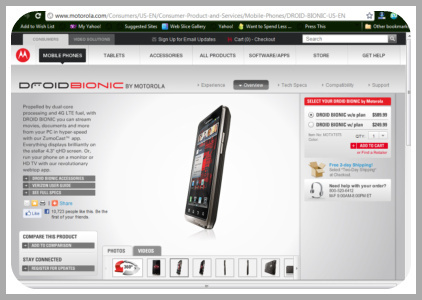
Obviously, my first stop in researching was the Motorola website – they’re the experts, right? The site is super user friendly, and had a ton of info to give me a really good basic overview of the Bionic – it’s got a bigger touchscreen than my current phone, a longer battery life {super important for a blogger on-the-go like me!} and a super sweet 8 mega pixel camera. Since I do a ton of product reviews, having a great camera on my phone is such a helpful tool. And I hear that the Bionic takes some pretty amazing video too. It’s sounding like a really good option for me so far….

Heading to Verizon Wireless

Time to head into my local Verizon store – to get some hands-on action with this phone. I love online shopping: it’s easier, usually cheaper, and way less stressful than heading out to the stores this time of year. But there are some things that are hard to judge by online pictures alone – Like a new swimsuit or pair of skinny jeans, the only way to know if this phone is truly the right fit for me is to try it out in person.

Action Time

As I approached the front door, I could see that this place was packed!! Even so, I was greeted right away, and directed over to the Motorola Bionic quickly. The sales guy didn’t really have a ton of info to share, but that was ok, since I already knew a ton about this phone, and what I really needed was just to get it into my hands. Unfortunately, they didn’t let me take any pic’s inside the store, so I can’t show you it in use. Here’s what I thought though: It’s pretty impressive looking – really sleek, great design. Right away you notice some great differences that set it apart from other phones – the screen is really large and full, and super clear. And it is fast! The pages load about twice as fast as they do on my current phone. That is a HUGE improvement. But, the price is pretty high – without a contract it’s almost $600, and even with a 2-year agreement, it’ll run you close to $300. Since my current phone is still pretty new, it’d take some pretty impressive features to make me pay that much to switch right now. More research needed….

Next Stop – The Valley Mall

My next stop was the Verizon Wireless kiosk in the mall. I loved that it was totally quiet there {surprising this time of year} – and that meant that the guys working were able to help me without being rushed. They said that the Bionic has been one of their most popular phones, and it has had almost no complaints after purchase, which is pretty impressive to me. I used to manage that PacSun store you see behind this kiosk, and I know that people love to come back and complain about their phones. Knowing that the Bionic customers are really satisfied with their purchases is pretty impressive to me.

Motorola Bionic Review

I love this video… {Can’t see the video? Check it out on YouTube} – It explains in plain talk how the Motorola Bionic compares to other smart phones. This really helped me to realize the value of the phone, and why it might be worth the money to upgrade. The main point that stuck with me is that, while the Bionic might be a teeny bit bulkier than other phones, its speed, power, and features make it more comparable to a tablet – but it’s smaller and more portable than a tablet. That makes the Bionic a seriously awesome phone!!

Conclusion

Well, the Motorola Bionic has really impressed me. The speed, the camera and video capabilities, and the battery life are all exactly the type of upgrades that I’ve been looking for. BUT- they’re not enough to make me upgrade quite yet. But – when my contract is up this spring, this phone is at the very tip-top of my list. I really need an all-in-one gadget to have on me at all times, and this sounds like the perfect fit for me. To see my full shopping experience, check out my Google+ story too!

Are you looking for a SmartPhone?
SPECIAL DEAL on Motorola BIONIC through the #MotoCalyp campaign:
Buy Now & Get Free 2-day Shipping!!

{Disclosure: This shop has been compensated as part of a social shopper insights study for Collective Bias. All ideas, opinions, and photos are entirely my own.}

signature

Wikets – Rec it for Sweet Rewards!

Thank you to Wikets for introducing me to this iPhone/iPad app. You can download Wikets from the App Store here – Wikets App – available Nov. 7.

The Simply Rewarding Way to Share Your Best Recommendations!

So, you know how you’re always on the look out for the coolest new things – like the yummiest restaurant, the hottest music, or the best deal on amazing shoes? And you know how when you find that great stuff, your first thought is to share it with your friends? If right now you’re like “I totally know what you’re talking about Meagan!!” – then guess what? You’re in luck. There’s an app for that. A cool one.

Introducing my new BFF – The Wikets App!!

The brand new Wikets app was released just a few days ago, and is available to download for your iPhone and iPad. It’s totally free, totally awesome, and I’m totally going to tell you all about it! Keep reading to learn why I think it will rock your socks –

Top 5 Reasons why Wikets is amazing:

  • 1. It’s FREE: That’s my favorite price.
  • 2. It’s fun: Who doesn’t love sharing cool stuff with their friends, and earning cool rewards, right?
  • 3. It’s helpful: When you have the Wikets App, you can browse around by location, and see restaurants, clubs, coffee shops, and more, that people have recommended. Want to try somewhere new for dinner? Type in Mexican Restaurant, search locally – and find a brand new spot that one of your girlfriends has “rec’d” on the site!
  • 4. It’s Rewarding: On Wikets, you add places, products, and services that you love – that’s called a “rec” – and the more active you are, the more points you earn! Plus, while you’re browsing on Wikets, if you see a super cool rec that you love, you can go directly to purchase it – which rewards you with even more points. Those points can then be redeemed for free gift cards to your favorite stores!
  • 5. It’s Social: Get your friends to join {be sure to share my code, SunshineSippy, so they get BONUS points for joining – see more on this below!} – so you can all get started sharing great stuff, and you can find new favorite places and products that they share.

How it Works:

Grab the Wikets App today, for your iPhone or iPad – and use my fan exclusive bonus code – SunshineSippy!

Once you’ve got the app, you start by answering  a few questions from them, to get your first rec’s added – things like your favorite song and favorite restaurant. {You can see a few of my favorites in the pic!} Then you can add other favorites – anything from one of their partners, which include big favorites like iTunes, Amazon, Etsy, Ebay, and more. If you can pull a location up on Yelp or Foursquare, you can rec it. And if it has a barcode, you can rec that too! So it’s super easy to find tons of favorites to add.

It’s a Social App!

The whole point of this app {well, of course besides earning sweet freebies!} is to share your rec’s with your friends and followers – the more people sharing, the more useful the app is for everyone. It’s kind of like how when you check out a cool new club, you want to share it on Facebook, so all of your friends will know about it too – well now, you can rec it on Wikets, earn points, help other users learn about it, then share it directly to your Facebook page too!

How to Find Cool Stuff

On Wikets, you have a little bar on the bottom of the screen – you can just browse new rec’s, check out local stuff, see what your friends have rec’d, and more. So it’s always easy to stay updated on what’s new and awesome. Love it, right?

Get Started Today!

Get the Wikets App from the App Store Today!

Regular users get 200 points for signing up. But you, and anyone you want to share my unique promo code with, will get an EXTRA BONUS 200 points!!  {Promo Code: SunshineSippy}You’ll also earn double points when you start too! There are tons of rewards to choose from, but an example is – 2500 points = $25 Amazon Gift Card. Adds up super quick, trust me!

  • After you’ve installed the app, get started recommending products and places, adding to your wishlist, re-recing, etc.
  • Share with your friends! This app is much more fun when more people use it. Since it’s brand new, your friends will appreciate being introduced to it, so you can all be the first to start earning.

Get the new Wikets App today!! Use my code – SunshineSippy – to get BONUS points when joining, and share it with your friends too!!!

Don’t know how to add an app? Learn How to Download an App to your iPhone!

Check out Wikets:

Thank you to Wikets for sponsoring this blog post. Please click here to learn more about the app. I was selected for this sponsorship by the Clever Girls Collective. All opinions expressed here are my own. #CleverWikets #spon

signature