script async src="//pagead2.googlesyndication.com/pagead/js/adsbygoogle.js"> google.com, pub-0949974396517105, DIRECT, f08c47fec0942fa0

Win a Battery-Charging iPhone Case with Speaker Amplifier!

The things you want… At your doorstep! That’s Doorstep Genius… We all love to shop online, right? It saves a ton of time versus driving around town to a ton of different stores, dragging the kids through crowded shops with you, trying to find all of your rewards cards and coupons at check out… Whew, I’m tired just thinking about it! We’re too busy for that most days aren’t we ladies? BUT – we still want to make sure we’re getting the very best deals on what we buy, since most of our budgets are a lot tighter than they were a few years ago, right? So let me share a few tips, some great sites, and give you a chance to WIN some new gear totally free too, sound good?

Doorstep Genius - Things you want at your door!

Doorstep Genius & Sharing Spree = Awesome!

Doorstep Genius is a great place to find really sweet deals – and now this week they’ve partnered with Sharing Spree to offer an even sweeter deal – Get a Battery Charging Speaker Case for iPhone 4/4s, regularly $80, for only $29. That’s over $50 in savings! This is SO helpful when you’re trying to show off a funny video of the kids, but the sound is just too low. Or if you like to use Pandora on your iPhone – this will be a lifesaver in boosting the volume! And…. One of you lucky ladies {or gents!} is going to WIN one – thanks to Sharing Spree and Doorstep Genius. Awesome.

Battery Charging Speaker Case for iPhone 4/4s

Enter to WIN it!

All you have to do to have a chance to WIN this sweet set of gear is to use the easy peasy Rafflecopter form below to get your entries in. You can complete as few, or as many, as you’d like – they’re ALL optional. But the more that you complete, the more chances you’ll have to win. And – if you’re feeling lucky, scroll down my sidebar and enter to win all of the other awesome prizes that I’m giving away this month too!

Check out my BIG list of tips on 15 Awesome Ways to Shop for Free, perfect for the holiday season!

Have fun & good luck!

[Read more…]

signature

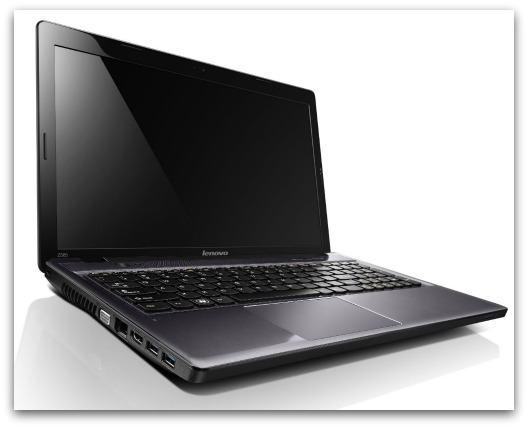
Gadget Giveaway: Enter to WIN a Lenovo IdeaPad!

Hey you – you gorgeous and amazing ladies reading this page today! {And of course, you handsome men, if you’re reading too…} I’ve got a super sweet new giveaway to share with you guys – the prize is uh-MAY-zing, and it’s using a different entry form then you’re used to here. It’s still really simple, like the Rafflecopter, but it verifies the entries more fully, which saves me a lot of work! Let me know what you think about it, or if you have any problems. Now, on to the fun part – the prize!

Win a free Lenovo Ideapad

About the Prize

One amazingly lucky reader will win a brand new Lenovo IdeaPad Z585 Laptop! So cool. And, for you techy types, here are the details and specs for this great gadget:

Lenovo IdeaPad Z585
AMD A8-4500M 1.9GHz
6GB Memory 750GB HDD
AMD Radeon HD 7640G
DVD±R/RW

Additional Features
Stylish design in premium brushed gray metal
Integrated AMD Radeon HD graphics
OneKey® Theatre, with touch-sensitive hotkeys, for one-touch audiovisual optimization
Dolby® Home Theater v4, with specialized stereo speakers for crisp, clear surround sound
Intelligent TouchPad, supporting multiple-finger gestures
Integrated 720p HD webcam, HDMI
Two USB 3.0 ports, 5-in-1 card reader
AccuType keyboard
15.6” HD LED backlit display
DVD Drive
OneKey® Rescue for system backup and restoration
Lenovo Energy Management

Ready to WIN it?!

Use this super simple Punchtab form to get your entries. Here’s how it works: Click to start it with Facebook or your email. That’s how it knows who you are. Then you’ll see the first entry – either complete it, or click the “skip” button in the lower right corner. Then repeat that through all of the entries – do the ones you want, skip the ones you don’t. Easy peasy, right? Once you’re finished, it will give you a personalized link… Use that link to share the giveaway on your own Facebook or Twitter – or wherever! – and get bonus entries each time someone clicks to enter from your referral link. Awesome, I know.

Have fun and Good Luck!

[Read more…]

signature

Is Your Wireless Company Just Not That Into You? #HelloBetter

Do you love your wireless provider?… I can answer that with a big ol’ NO WAY JOSE!! The last time my phone broke, and I had to head to the local cell store to get a new one, the clerk either made a mistake, or purposely tricked me – either way, I ended up signing up for things that I did NOT realize I was going to pay for, and sure as heck didn’t need. It was another big mess to get it all fixed after I figured it all out. So, if you’ve had bad experiences with your provider too, you’re gonna love this new campaign from US Cellular called Hello Better. What is it? Well girls, keep reading and I’ll tell ya all about it! 

Hello Better with US Cellular

What does Hello Better mean? It means saying goodbye to things like plans that don’t include enough data, minutes, or option, and saying hello to unlimited plans for single lines or even whole families. It means saying hello to a super sweet rewards program that lets you earn points for things like free phones and accessories. It means saying hello to a company that has surveyed women across the country to learn what they really need in a wireless network – and are now totally delivering it.

“By introducing the Hello Better campaign to the public, U.S. Cellular is encouraging people to say goodbye to dysfunctional wireless relationships and say hello to a better experience. Goodbye neglect, hello respect.”

Do you hate your cell phone plan?

It’s not you – it’s them!

Where do you fall on this chart? I’m part of the 54% of peeps in the Pacific Northwest who are totally unhappy with their service provider – and it looks like all across the nation, the amount of women who are not feelin’ their cell phone providers love is pretty similar – almost half in most areas. That’s crazy, right? If half of Americans are unhappy, don’t you think someone should do something about that? Well lucky for us, US Cellular is that someone!

Start seeing other carriers

Are you ready to “see other people?”

If so, then US Cellular will be the plan of your dreams. Check them out today to get sweet unlimited plans that don’t have a ton of strings, that awesome rewards program that I told you about, and really personal service and help when you need it. Here are a few more reasons why they are rockin’ the wireless world right now:

  • In addition to passionate associates, U.S. Cellular provides customers with unique benefits such as the industry’s only points-based rewards program, no contract after the first contract ends, free incoming calls and texts, free Overage Protection and free Battery Swap for your device.
  • U.S. Cellular believes that people deserve better. A mobile phone is supposed to make life simpler and easier to get things done. Your relationship with your wireless carrier should be the same. US Cellular treats their customers like neighbors, not numbers.
  • Out of the 1,208 participants polled across four regions of the country, 56 percent of the respondents admitted to being unhappy with their carrier over the past year but only 35 percent of all respondents have ever broken up with their provider. That’s why US Cellular is working to make it much easier!

It’s no secret that people are frustrated with their wireless experience, but people tolerate less because they don’t believe there is a better option. You deserve better! So say hello to better with US Cellular today. Seriously.


signature

How to project videos from your phone to any surface – #3MSummerFun

“Memory is a way of holding onto the things you love, the things you are, the things you never want to lose.” – The Wonder Years…. Here are a few things that I love – Family and friends, photos and videos, tech that’s simple but super smart. Combine those all into one amazingly cool gadget, and you’ve got the new 3M Mobile Projector. This is one of the most awesome ideas that I’ve seen in a very long time – and as a blogger, I get introduced to a TON of new gadgets and products every day. So when I tell you that THIS is one of the best I’ve seen, you know it’s goooooood…..

“We do not remember days; we remember moments.” – Cesare Pavese

As you can see, this baby is a powerhouse – there are SO many rad ways that you can use it!! When we got ours to test out for a couple of weeks, my big plan was to do a super fun outdoor “Drive-In” style movie night. When I was a kid, I just adored watching my fave films at our local drive-in, but it closed down about 10 years ago, so none of the kiddos in my family have had that experience. But, we’ve had a rough week around here. Every single one of us has been sick, and we’ve had crazy rain and lightening storms. {Check the news for Washington state lightening storms – it’s been a mess!} So I had to settle for checking out the fun photos from my friend Jennifer at Makobi Scribe – I was totally jealous of their kid’s Make Your Own Drive-In party. Super cool.

So I asked: “What else can you do with the 3M Mobile Projector?

And oh baby, there are SO many answers to that question! Let me share some of my favorite features of this sweet gadget, and some cool ways that we used it in my home. But warning: if you read this, you are going to be so in love that you will grab your wallet and head out to buy one of these right away too. So only keep reading if you’re ready for a little tech shoppin’….

3M Mobile Projector

It doesn’t get much cooler than this

So, I love gadgets, but I do tend to be a little bit tech-challenged. Since this looked so uber duber cool, I thought it would be tricky to get started with. But, all I did was unpack these few pieces that came in the package – the Projector itself, a couple of instruction guides, a cord to attach the projector to my iPhone, and a charger. That’s it. Plug one end of the cord into the projector and the other into your phone, pick a video to watch – from YouTube, Hulu, or your own personal videos – and BAM! when you hit play on your phone, you’ll see it projected! Um, that’s it??? Yep, that easy. I was in love at first byte… or something like that. {I’m not totally clear on what a byte is?? Anyway…}

how does the 3m mobile projector work?

“There are lots of people who mistake their imagination for their memory.” – Josh Billings

Since I was totally unprepared for this to be so simple, I was as surprised as Abby was when a video of her and our puppy Deuce showed up on the kitchen tile. She was hysterical – she jumped right down there on the floor, pointing at our doggie, just a gigglin’ away! Honestly one of those priceless moments. So sweet. I snapped a couple of quick pics, but I had to use Mike’s phone, since my iPhone was already in action with the projector. The photos weren’t real clear, so I thought I’d get a few more to show you how crazy-awesome this is, but I really couldn’t get any to do it justice. When it’s dark enough to see the projected videos clearly – it’s too dark for his phone to take pics. When there’s enough light for good pics, you can’t really see the videos. I guess not ALL tech situations can be as perfectly put together as this projector is! You’ll have to trust me on how cool the images look, but let me share a few cool ways we used this:

  • Bedtime: Abby has a tough time getting to sleep lately. She never wants to stay in her crib {which is still in our bedroom until my brother moves out of the other bedroom} and usually ends up with us. But when I set up the projector to shine a movie onto the ceiling above her bed, she is able to calm down and drift off to sleep watching Tangled. Thank you 3M!
  • Family Videos: Grandma can’t see those bitty images on my iPhone, no matter how adorable they are. But she was so amazed to watch them projected up onto the living room wall. This is an awesome way to share fun photos too.
  • Running Errands: We had a couple of doctors appointments this week, plus sick kids to go to them, which usually leads to crabby demeanors. But when I projected videos onto the back of the seats while we drove, then shined funny YouTube clips onto the floor of the waiting room – I made not just ours but all the OTHER kids pretty darn happy too!

I can see this being a huge hit at our backyard BBQ parties too – to share old videos and pics of the guests, funny videos or music clips to liven things up – or a great movie beamed up onto the patio wall! Love, love, LOVE everything about this projector. {Did I tell you that I love it?}

projector for iphone and apple products

Family fun just got epic

The 3M Mobile Projector connects to Apple products like your iPhone or iPad. You have about 2 hours of juice per charge – plenty of time for almost any movie – {if you wanted to watch a super long one, just use it somewhere that it can be plugged in to charge while playing, no worries.} You can watch your own videos, share your photos, or view flicks from YouTube, Netflix, iTunes, and more! You can even purchase an additional tri-pod to make set up even easier. To learn more about how insanely cool this is – plus get specs, and more cool visuals of it in use – visit 3Mmobileprojectors.com today!

Follow them on Facebook and Twitter too to stay updated on new products and promotions! 

{Disclosure: I wrote this review while participating in a blog tour by Mom Central Consulting on behalf of 3M and received a promotional item to thank me for taking the time to participate.}


signature

Tie Tech: The Digitwirl Father’s Day Gift Guide

Father’s Day Gift Guide – Need I even say it? Ties are so passé, it’s not even funny. Unless your dad is rooted firmly in the dark ages, chances are he’ll want a little less “tie” and a little more “high tech” this father’s day. A little clueless about what the man wants? No worries— here’s a parade of the latest and greatest dad-friendly gadgets and apps.

father's day gift guide for tech lovers

Father’s Day Gift Guide for tech lovers

You can view the slideshow over on the Digitwirl site to see ALL of the awesome picks – Father’s Day Gift Guide. But here are a few of my total favorites from their list of super cool gadgets and gear that will be perfectly suited for any dad in your life this Father’s Day. I found great gifts for my brother, my dad, Abby’s daddy, and even grandpa! I call that smart shopping – thanks Digitwirl!

  • Is it cold in here? Not anymore, thanks to the Nest Learning Thermostat. It’s easy to program, but it’s so much more— it actually learns your habits, and creates your home’s unique thermal profile that helps you save energy. Plus, it’s beautifully designed so that while dad will love it for it’s utter geekiness, full of knobs and buttons that make it intimidating. Is it cold in here? Not anymore, thanks to this sweet gadget.
  • Grillin’ Guy: If your man has a thing for setting meat on fire, the iGrill Digital Grilling Thermometer will be the way to his heart. This digital probe thermometer tracks the internal temperature of whatever you’ve got cooking and let’s your iPad or iPhone know when it’s cooked to perfection. Now you can mingle with your guests and never worry that you’re dinner’s too raw or charred beyond recognition.
  • You say Nikki Minaj. He says Nikki Sixx: You say Deadmau5, he says Doobie Brothers. Before you call the whole thing off, get a Spotify Premium Membership. Millions of tracks from all decades, available for streaming on any device. The free version is cool, but premium gets you better sound quality, no ads, and the ability to listen offline.
  • Capturing Memories: If dad’s idea of a good time involves extreme weather or extreme sports, he’ll want a camera that can keep up with his adventures without getting in the way. He can mount the ContourROAM Hands-free HD Camcorder to his helmet, handlebars or ski tips and then, with the push of a button, capture beautiful HD video from a unique first-person perspective. When he’s done being a daredevil, he can strap it to the stroller and capture your toddler eating ice cream on the way home from the parlor. Priceless.


Check out all ten great gift ideas in the slideshow on the site. And for more of the coolest Father’s Day ideas, check out my Pinterest board. You’ll find loads of “Manly” recipes featuring bacon, cheese, and beer. Super sweet crafts and gifts that kids can create for dad. And cool gift ideas that you can order online to surprise your special mister.

What are YOU getting the special dads in YOUR life this year? Share some fun ideas in the comments!

carley knoblock bioDigitwirl is the weekly web show that offers simple solutions to modern day problems. In 3 minutes, Digitwirl brings busy women the very best time, money, and sanity-saving technology, and then teaches them how to use it, step-by-step. Digitwirl was created by technology lifestyle expert Carley Knobloch, who uses lots of technology to manage her busy life as mom of two and entrepreneur. Become a subscriber to get weekly show alerts and exclusive deals at Digitwirl.com, or follow Digitwirl on Twitter at @digitwirl.

signature

Is Facebook Really Charging for Status Updates?

No, not exactly. But – if you haven’t noticed it yet – there is a new option available to all business page owners when you write your next status update. It’s called Facebook Promoted Posts – “Promote your page posts so more people see them in their news feed.” Sounds great, right? But there’s a catch – you have to PAY to have those posts promoted. That does not sound so great.

mobile facebook use

Did you know… only 16 out of every 100 of your “fans” actually see your status updates?

If you haven’t seen the new update about Promotional Posts yet, you should soon. When you use Facebook as your page, and begin to write your status update, it will show you a pop-up bubble with the option to promote that post. If you click for details, it will then let you know that you’ll be paying for that chance to have your post seen by more of your own fans. This feature started as a test option, where personal users could pay to have their status updates shared more widely, but they quickly realized they would have better luck getting businesses to pay. I had a feeling that Facebook would soon start charging business owners more fees, but this was still pretty surprising. And personally, I think it’s a bad move – Here’s why:

  • First, Facebook said that it wants brands to act more like people – interact with users, not advertise to them. They even have a rule that when you create the large banner image for your Facebook page, you cannot promote sales or deals – because the goal is to have pages to create good content, not ads. So – they will prevent you from using the graphic on your page as an ad, but will now allow you to treat the status updates that you post as ads, by paying to ensure that they are seen? That doesn’t make a lot of sense to me.
  • Why not just show all of my fans my posts anyway? If Facebook is serious about their stated goal of improving the user experience, then why do they hide my posts? When I like a brand or blog page, it’s because I’m interested in following their posts, and learning what they have to say. So why hide things from me that I chose to follow?
  • Right now, Facebook shows your post to a limited amount of your fans – the average is 16%. How do they decide who to show it to? Well, they look at whether someone has interacted with your page before, whether the status update is popular {lots of likes and shares means Facebook will show it to even more people}, and what the content is {picture, video, links, etc}. They do this with a goal of giving you only updates that will be interesting to you. So why would they do the complete opposite, and allow people to pay to show me status updates that Facebook would not have shown me in the first place?

But, this is the way it is now, so I have to adapt. We all do. And, from what I’m hearing around the web, there will be a lot more changes coming soon too. {Isn’t there always a new change coming to Facebook? Ugh.}  While they still guarantee that Facebook will never charge people to use it, they WILL be adding quite a few more features that they can charge business owners to use. I hope the next ones are better than this.

If I wanted to pay for an ad, I would. I shouldn’t have to pay to have my status shown to people who have already chosen to like my page.

Well, now that we know what this new Promoted Posts tool is, let’s take a look at how it works, so you can take advantage of it if you choose to. I mean, like it or not, working on the web means constantly adapting to new changes. So – here’s some basic tips on using the new Promoted Posts function on Facebook.

  1. Switch to use Facebook as your page, and click on the status update box, to start a new post. You’ll see a new button at the bottom of the box, labeled “Promote.”
  2. Click the drop down menu arrow, and you’ll see options to set your price, payment method, and other settings.
  3. Now, you can promote your post. You can also go to other previous posts {from the last 3 days only}, and add them to be promoted as well, within the budget amount that you have set up.

When the post appears in people’s newsfeeds, it will be labeled as sponsored. I’m not sure how bold the label will be, or whether it will appear more spammy looking to people. But – I can see the appeal to this option. We’ve all used Facebook for such a long time, that our eyes are trained to kind of ignore that side of the page where the ads are. Think about it – Can you remember any ads that you’ve seen lately? But you DO notice what’s in your newsfeed, so allowing brands to add their sponsored posts right into the stream you’re reading – right in between an announcement about your best friend’s new baby, and an upcoming graduation party for a niece, then the sponsored post is pretty darn likely to be actually looked at and read. This also helps with the mobile user problem – a growing percentage of people visit Facebook primarily from their cell phones, totally bypassing ads altogether. But now, brands have a new way to reach them.

What Facebook says about Promoted Posts

“Nothing has changed about how your posts are shared with the people who like your Page.” – Facebook.com A lot of activity happens on Facebook and most people only see some of it in their news feeds. They may miss things when they’re not on Facebook, or they may have a lot of friends and Pages, which results in too much activity to show all of it in their news feed. If you don’t promote your post, many of the people connected to your Page may still see it. However, by promoting a post, you’re increasing its potential reach so an even larger percentage of your Page audience and the friends of those interacting with your post will see it.

Facebook like button

Do you “Like” this new update?

Is this tool something that you’ll use to promote your own posts? As a user, do you think you’ll be bothered by these sponsored updates in your newsfeed? I’d love to hear some comments on all sides of this issue – I’m still trying to figure out what I think about it all. And, if you’d like to learn more, you can visit the Facebook Promoted Posts FAQ page, and a little more about Facebook advertising and it’s always changing form.

{Photo credits: First photo, second photo.}

signature

What I Learned By Getting Hacked

malware warning from Google

“The Internet is the first thing that humanity has built that humanity doesn’t understand, the largest experiment in anarchy that we have ever had.” – Eric Schmidt

Most of you know by now that my website was hacked last week. You probably saw big warning screens like the one above when you tried to visit my site. And most of you have been asking what happened. So… Here’s the story: I’m traveling like crazy this month, so I had to cram most of this months blogging work into one week and a half long period in between a conference in Texas, and my trip to the Nike Young Athletes Innovation Summit in a couple of days. I was pretty stressed at how much work I had to do, but ready for the challenge.

Then – I got hacked.

I mean, majorly hacked. I had been working on a sponsored posts for Clever Girls, and took a break for lunch. When I came back to my desk, my dashboard had been replaced by a huge malware warning screen. I freaked out a bit. I’m NOT tech savvy, and am not good at troubleshooting when things go wrong. So my first step was to check in to my Facebook groups to ask for help. None of the simple solutions worked. Ugh. What to do?

“There are three kinds of death in this world.  There’s heart death, there’s brain death, and there’s being off the network.” – Guy Almes

I was already starting to get messages – emails, tweets, fb comments – asking what was going on. My next step was to call my hosting company for advice. Long story short – After 2 days of waiting, being assured that the scanning service I had purchased would find the problem, and the GoDaddy security team would help me fix it once found – I was informed that all 5 people I had spoken with had given me the wrong info. While the scanning system would assist me in finding the issue, there was no one at GoDaddy who would be helping me to fix it. Oh. My. Heck. 2 1/2 days of waiting to find out that I was still at square one?? I kind of lost my cool for awhile. Luckily for me, the uh-MAY-zing Beck Ryan from Stone Alley 4 WP came to my rescue!! {Connect with her on Facebook too – she is awesome.} Everyone has told me how super smart she is at fixing just about any WP problem imaginable – so I was so relieved to have her helping me out! She was able to login to my account, find the malware, and clean it up right away. But…. It kept coming back. Again, and again. Since Becky is pretty much a genius with this stuff, she was incredibly frustrated by this – and said she’d never seen anything quite like it. Finally, I felt bad for taking up so much of her time, and decided to look for some additional outside help.

“A blogger is constantly looking over his shoulder, for fear that he is not being followed.” – Robert Brault

At this point my Adsense account had been suspended, I had caused problems for a ton of other bloggers who were linked to me, Google had me blacklisted – and I’d missed an incredible amount of deadlines. And – I’d been online night and day, trying everything I could to get things fixed. Every time we thought things were clean, and starting to clear up – another attack would hit and knock me back down again!! But, finally, we figured out what we THINK was the trigger to it all –

The problem: ADV Plugin Scam for WP – Malware and More!

I’m always super careful about adding plugins. But, this was back at the holidays, the company had looked reputable, and I was so over-worked that I fell for this and didn’t do my research. It was supposed to be for adding ads to my site – but then I didn’t realize in the craziness of the holiday season, but I never heard from this company again, and just kind of forgot about that plugin. It was most likely the door that let the hackers into my site. From what GoDaddy told me, this malware originated in Russia – it caused my site to FILL with porn pop-up ads, and added malicious code that would attack the visitors computer. Since this was such a devastating ordeal, I have named it the Russian Porn Pop-Up Attack of 2012, to try and give it a bit of humorous side. You know, so I don’t cry when I think about it :)

The Silver Lining in the Malware Cloud

Does it seem crazy to say that while this was the MOST stressful thing that has ever happened since I’ve started this site, it also had some positives to it? Well, it did, and I want to share some lessons learned:

  • I now know SO incredibly much more about the inner workings of my site than I did before. I know what FTP is, where to login to it, and how to change my password. I know how to look at the coding in my site, and some red flags to watch for. And I know everything in my Webmaster Tools dashboard like the back of my hand!
  • I finally added some extra services to help me run my site. Things have gotten too big for me to handle it all on my own. And, since I rely on only this income to support me and my little girl – I cannot afford another crisis like this! I now have a great security company doing daily scans of my site, monitoring it for problems – as well as basic maintenance package to stay on top of updates.
  • I learned that I have an incredible group of friends and fans online! I cannot even tell you how helpful all of the tips and information you all sent me. The words of encouragement were so needed and appreciated. And to all of the other bloggers who offered assistance – You all rock. I had no idea how truly amazing the people I’ve met online really were until this crisis hit!

So – Thank you SO much to everyone for sending me the kind words, the offers of assistance, and great tips to try. Luckily, everything is FINALLY fixed, and determined by Google to be totally clean and safe again. Whew – What a week it’s been!

What to do if your site has been hacked:

Most cases of malware are pretty simple to clean up – might be a bad link in a spam comment, or an ad or button in your sidebar causing problems. But if you think you’ve been hacked, here are a few tools and resources to check out:

  1. Check out your sites health in the free security scan on Sucuri.com – it’ll let you know what types of problems your facing.
  2. If your WordPress site was hacked, this article will give you some tips on what to look for – if you’ve got some decent tech skills, you might be able to fix it up yourself.
  3. Need more help? Then check out the great services offered at Stone Alley 4 WP – she is totally affordable, and super amazing!
  4. Want to protect yourself from problems in the future? Check out this article on How to Protect Your Website from Hacker Attacks. Great tips that can help you avoid a huge catastrophe like I just went through.

Make sure to always keep your site updated with the latest versions of WordPress and each of your plugins. Be sure to use secure passwords. Be cautious in how many plugins you use, since they do add a bit of risk to your site. And if your site is more than a hobby, I recommend adding a maintenance package and security services to your site too, to make sure you have access to quick assistance if you need it.

Share your story

Have you ever had your site hacked? Any tips to share – what to avoid, how to fix it, services that rocked? Share your story in the comments – maybe it can help someone else avoid a mess too!

Thank you so much for your patience & support – I’m glad to be back!!


signature