script async src="//pagead2.googlesyndication.com/pagead/js/adsbygoogle.js"> google.com, pub-0949974396517105, DIRECT, f08c47fec0942fa0

How Hack Friendly is Your Password?

This is a Sponsored post written by me on behalf of LifeLock Facebook for SocialSpark. All opinions are 100% mine.

The wild, wild, web can be a dangerous place. I consider myself pretty tech savvy most of the time – But even I have to be super careful online each day. Hackers and sneaky-sneaks get smarter every day – every time you learn a new tip to keep your information and identity safe online, it seems like they learn a new way to steal it from you again. But, there are some basic steps you can take to keep yourself safe. And there is a site that’s kind of like an online superhero, working tirelessly to swoop in and save the day if you get into any type of trouble. Keep reading to learn more…

AmeliaIZEA | skitch.com

Are you safe from hackers?

Many of you might remember when my blog got hacked earlier this year. It was a DISASTER. It took a full week to get things all straightened out… I lost a week or revenue from my site, missed a ton of deadlines, and spent countless hours emailing and making phone calls, trying to find a solution to the mess. I’ve also had my PayPal account hacked into, and my email and Facebook have both suffered from mini-security lapses. I learned quickly that passwords are something not to be taken lightly! You never want to use things like 1234567, or ABC123, and please, oh please, do NOT tell me that any of you are still using “Password” as any of your passwords?? Do you know how fast a professional hacker can breach your password security?

  • If you have 6 characters in your password with no symbol, it only takes a pro hacker .000224 seconds.
  • If you have 10 characters and one symbol in your password, it takes up to 20 days for a pro to break in and steal your info.

What a HUGE difference that small change brings, right? So make sure to make things as safe as possible – use a mixture of upper and lowercase letters, numbers, and symbols. To make it easier to remember, pick a word like “elephant.” But change the letters to numbers or symbols, so you have something like “El3ph@nt!” – much harder for someone to figure out. Learn more: How hack friendly is your password?

What you can do to stay safe online

Besides using better passwords, the best piece of advice is just to be smart – If a link looks suspicious, don’t click it. If you get an email that feels a little weird – do some research. Example: I’m pretty sure that my PayPal was hacked due to me clicking on a link in a fake PayPal email. It seriously looked amazingly real – but said that someone had returned a credit from a purchase to my account, click here for more info. That sounded odd, and I wanted to see what it was… Then gave my password to the fake PayPal site. Ugh. Instead – if something looks a little off, just type the website {like PayPal, or your bank} into your browser to visit it, so you can be sure. Another great way to keep yourself safe – especially when you’re a crazy-busy super-mom like me, is to use a site like LifeLock. Here are a few of the services you get on their basic plan – you can upgrade to get even more help!

  • Alerts of potential threats–both credit and noncredit related
  • Online access to a personalized dashboard showing current threats
  • Relentless identity monitoring for exposure of your personal information
  • Member services with local phone support—24 hours a day, 7 days a week, 365 days a year
  • Stolen or lost wallet remediation services to help cancel and replace credit and debit cards
  • Comprehensive recovery services if you become a victim of identity theft on our watch

Awesome, right? It’s like having a super cool super hero watching over your shoulder, protecting you from the bad guys of the web. You can learn more on their website – LifeLock.com, or check out LifeLock on Facebook to see what other real moms like you have to say about the service.

Let’s Chat: Have you ever been the victim of identity theft or hackers?


Visit Sponsor's Site

signature

Gadget Giveaway: NetTALK with Wi-Fi

The netTalk Duo Giveaway hosted by Mom Are We There Yet… This is a super cool product that I was excited to learn about – so when I had the chance to offer this giveaway to you guys, I thought you guys would love it too. One lucky winner gets a sweet new

Read what Mom Are We There Yet had to say about using the new NetTALK

My sister got her set months ago and hasn’t stopped raving about it, so I decided to try the netTALK too – and I’m never going back. I cancelled the service for my landline completely, and just got rid of a monthly bill that I have had for 25 years!
The netTalk Duo Wi-Fi is a great solution to budget woes – At a retail price of $74.95, you get the device, as well as year of service that includes calls to the US and Canada. They also have an affordable plan for international calls.
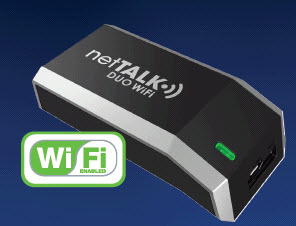
I found the netTalk Duo to be quite easy to install. All I had to do was attach it to my router and then plug my telephone into it. After that, I went online to their website and answered a few questions – and voila, you have phone service! Their customer service told me it’d work with my fax too.

I plan to eliminate my whole AT&T bill! I’m switching my DSL to a Time Warner Hot Spot so it’ll work on my laptop and desktop. Eliminating my landline and for the house phone and fax I’ll use the NetTALK. I’m going to be saving about $100 a month! netTALK also has a new and free Android App (works on most Android devices) that provides Free Calling throughout the US and Canada with the option to add low-cost international TALK credits to make calls from anywhere to anywhere in the world (with cell phone / WiFi service) without running up cell phone minutes or roaming charges. Great for traveling and keeping in touch with family and friends abroad! The app is available free at www.nettalk.com and at Google Play.

Rules and Product Info

The NetTalk Duo can be purchased at Target, as well as other leading retailers. {You can also find it online at Amazon, netTalk Duo Wi-Fi, best price I’ve found!} This giveaway runs from 9/1-9/15. It’s open to entrants 18 years of age or older, except where prohibited by law. US & Canadian residents only. No purchase is necessary to enter. The odds of winning are based on the number of entries received. To qualify to win, you must complete, at minimum, one entry on the Rafflecopter form. The winner will be randomly chosen by Rafflecopter. Winners will be notified by email from Mom Are We There Yet. Winners will have 72 hours to respond or risk forfeiting their prize. Prize may re-awarded solely by the Sponsor’s discretion. Prize fulfillment is the sole responsibility of the sponsor. This blog may not be held liable for Sponsors who do not fulfill prize shipments. Mom Are We There Yet was compensated for this post. I reserve the right to publicly publish winners’ names. By entering this giveaway, you are agreeing to these terms and conditions.

And if you’re feelin’ luck – scroll down my sidebar and enter to win the other prizes I’m giving away this month too!

[Read more…]

signature

The Non-Stalker Way to Track Your Every Movement

So…. I’m not exactly the type of girl you’d ever call “active.” I never played a sport, I’ve never been on a team, I’ve never gone to a gym. Ever. But – I was lucky enough to be one of those girls who never really struggled with her weight. I was never super skinny, but I was healthy and slim through high school. Even as I moved into my twenties and went up a pant size, it wasn’t ever a big deal. Then I got pregnant. Wow. Who even knew it was possible to pack an extra 75 pounds on my frame??? Suddenly, my weight had become a bit of an issue. And by a bit, I mean I bit my lip every time someone asked, “Ohmygosh, you look ready to pop any minute now!!” when I was only 7 months along. Oh, the joys of motherhood….

some ecards - I didn't make it to the gym today

I haven’t made it to the gym in 32 years. At least I’m consistent….

OK – forgive the pic quality on this one. It was a super small pic on some ecards, and didn’t want to play nice when I made it a little bigger to put it in this post. But – it’s the perfect picture to explain my life, and relationship to fitness. I remember when I was invited to bring my nephew to the Nike World HQ for the Young Athletes Innovation Summit earlier this year… They sent us an email a couple weeks before we’d fly out for this event, with suggestions on what we should wear. It mentioned not to wear competing brands – and to dress in sneakers, hoodies or tees, and comfy bottoms. I thought, “Oh. No. Do NOT tell me that I’m going to have to do activities. I don’t DO activities.” I was concerned… So I handled it by wearing jeans and wedges. No one can make me run in a strappy wedge sandal, right? Right. Luckily, there was lots of walking, but no sporty-type “fun” stuff that would lead to an embarrassing show of my lack of coordination. Whew. Now that you know all this about me, you’ll understand why I am pretty crazy-excited about a new little gadget {oh, how I love gadgets!} that is going to help guide me to a more active lifestyle, totally painlessly. It’s called the Fitbit – watch this quick video to get a feel for it…

video platformvideo managementvideo solutionsvideo player

 How cool is this Fitbit, right?

Saying that this little gadget is like a pedometer is like saying that watching a local singer perform at your fave coffee shop is like seeing Beyonce perform in Times Square – not even in the same ballpark! Yes, the Fitbit tracks your steps, but that’s where the similarity stops. It has so many super helpful tools that go along with it, that can help everyone from the totally non-sporty types like me push themselves to a healthier level, as well as help super-athletes track their training. How do I love the Fitbit? Well, let me count the ways….

  1. It’s simple: It’s crazy how easy it is to get started with the Fitbit. You open the box, place the Fitbit on the base, then plug it into your computer. Click through a couple of steps to set it all up – and BAM! You’re ready to rock. Seriously, it’s that easy.
  2. It’s easy to conceal: Unlike the big, bulky, ugly pedometers you’re used to seeing – the Fitbit is sleek and easy to hide. I clip mine over my front bra clasp – and honestly don’t notice it at all. {Although my toddler saw me put it on a couple of days ago, and is now constantly digging down my shirt, looking for it. Good times…} You can also clip it to your waistband, or pocket.
  3. It’s magic: Ok, not really. But it feels like magic. Everyday the Fitbit is tracking your steps, your stairs, your sleep, and more. But -there’s no need to have to plug it in regularly and download all that helpful into – it wirelessly uploads your data automatically to the Fitbit site, whenever you are nearby. Then you can monitor your progress, and use all of the sweet – and totally free – tools on their site. PERFECT for busy moms like me.
  4. It’s a multi-tasker: This baby is a hard worker – It’ll show you how many steps you took during a day, so you can work on increasing those steps. Each day around lunch I check my progress – if the number is low, I know I need to add in an extra walk around the neighborhood with Abby. It’s seriously helping me push myself to be more active each day – without going to the gym, or doing crazy workouts. Love this.

It tracks, analyzes, and stores data on your every movement, day and night – but in a totally non-creepy, not stalkerish way. More like a super cool and protective older brother, who’s just always watching out for you, and encourages you to do your best. You can even download an app for your phone, so that you’ve got help any time you need it – It can do things like let you know how many calories you should be eating that day, based on your activity level. I am so excited at the progress I’m making already, with increasing my steps each day. I had lost about 20 pounds earlier this year using the Nutrisystem diet. But now that I’m on my own, my weight has held really steady. I love that this gadget is totally pushing me to lose the rest that I need to take off too, by walking more, taking more stairs, and more. I can’t recommend it enough!

Fitbit: weight loss gadget

The Fitbit is available at Best Buy – save big on one today!

When you think of Best Buy, you usually think of things like geeky guys checking out the newest video games, and buying new ram or bytes or something like that to make their super computers even faster. {Or at least, that used to be my image of Best Buy…} But did you know that they have SO much more than just computers and games? They’ve got a great line of kitchen gadgets and gear {I’ll be showing you some awesome stuff from that department soon!} – as well as hair tools, mens shaving gear, and super sweet workout helpers like the Fitbit. And they have some of the most helpful staff you’ll find anywhere, so they will totally help you with tips on using any new gadgets you pick up too. Much better service than you’re gonna get by shopping at Walmart, or the guessing game you have to do when shopping online at Amazon. Love that. And if you’re thinking of picking up a Fitbit yourself – don’t wait! There’s a great coupon deal right now – Save 20% off any Regular Price Health & Fitness product. Rockin’.

WOLF Blogging Board Member and Brand Ambassador

As part of the new Best Buy Blogging Board – I’ll be a brand ambassador for them over this next year. Which means you’ll get to hear about all kinds of super helpful gadgets, gear, services, and more – that are available from Best Buy. I’m incredibly excited to be partnering with such an amazing company – and can’t wait to share more cool stuff with you ladies. Stay tuned!

See more real women using the FitBit on my Best Buy Pinterest board!

{Disclaimer: The reviewer has received compensation for this post in the form of the reviewed product or a gift card. All opinions are 100% the reviewer’s and have not been influenced in any way.}

signature

Is Your Wireless Company Just Not That Into You? #HelloBetter

Do you love your wireless provider?… I can answer that with a big ol’ NO WAY JOSE!! The last time my phone broke, and I had to head to the local cell store to get a new one, the clerk either made a mistake, or purposely tricked me – either way, I ended up signing up for things that I did NOT realize I was going to pay for, and sure as heck didn’t need. It was another big mess to get it all fixed after I figured it all out. So, if you’ve had bad experiences with your provider too, you’re gonna love this new campaign from US Cellular called Hello Better. What is it? Well girls, keep reading and I’ll tell ya all about it! 

Hello Better with US Cellular

What does Hello Better mean? It means saying goodbye to things like plans that don’t include enough data, minutes, or option, and saying hello to unlimited plans for single lines or even whole families. It means saying hello to a super sweet rewards program that lets you earn points for things like free phones and accessories. It means saying hello to a company that has surveyed women across the country to learn what they really need in a wireless network – and are now totally delivering it.

“By introducing the Hello Better campaign to the public, U.S. Cellular is encouraging people to say goodbye to dysfunctional wireless relationships and say hello to a better experience. Goodbye neglect, hello respect.”

Do you hate your cell phone plan?

It’s not you – it’s them!

Where do you fall on this chart? I’m part of the 54% of peeps in the Pacific Northwest who are totally unhappy with their service provider – and it looks like all across the nation, the amount of women who are not feelin’ their cell phone providers love is pretty similar – almost half in most areas. That’s crazy, right? If half of Americans are unhappy, don’t you think someone should do something about that? Well lucky for us, US Cellular is that someone!

Start seeing other carriers

Are you ready to “see other people?”

If so, then US Cellular will be the plan of your dreams. Check them out today to get sweet unlimited plans that don’t have a ton of strings, that awesome rewards program that I told you about, and really personal service and help when you need it. Here are a few more reasons why they are rockin’ the wireless world right now:

  • In addition to passionate associates, U.S. Cellular provides customers with unique benefits such as the industry’s only points-based rewards program, no contract after the first contract ends, free incoming calls and texts, free Overage Protection and free Battery Swap for your device.
  • U.S. Cellular believes that people deserve better. A mobile phone is supposed to make life simpler and easier to get things done. Your relationship with your wireless carrier should be the same. US Cellular treats their customers like neighbors, not numbers.
  • Out of the 1,208 participants polled across four regions of the country, 56 percent of the respondents admitted to being unhappy with their carrier over the past year but only 35 percent of all respondents have ever broken up with their provider. That’s why US Cellular is working to make it much easier!

It’s no secret that people are frustrated with their wireless experience, but people tolerate less because they don’t believe there is a better option. You deserve better! So say hello to better with US Cellular today. Seriously.


signature

How to project videos from your phone to any surface – #3MSummerFun

“Memory is a way of holding onto the things you love, the things you are, the things you never want to lose.” – The Wonder Years…. Here are a few things that I love – Family and friends, photos and videos, tech that’s simple but super smart. Combine those all into one amazingly cool gadget, and you’ve got the new 3M Mobile Projector. This is one of the most awesome ideas that I’ve seen in a very long time – and as a blogger, I get introduced to a TON of new gadgets and products every day. So when I tell you that THIS is one of the best I’ve seen, you know it’s goooooood…..

“We do not remember days; we remember moments.” – Cesare Pavese

As you can see, this baby is a powerhouse – there are SO many rad ways that you can use it!! When we got ours to test out for a couple of weeks, my big plan was to do a super fun outdoor “Drive-In” style movie night. When I was a kid, I just adored watching my fave films at our local drive-in, but it closed down about 10 years ago, so none of the kiddos in my family have had that experience. But, we’ve had a rough week around here. Every single one of us has been sick, and we’ve had crazy rain and lightening storms. {Check the news for Washington state lightening storms – it’s been a mess!} So I had to settle for checking out the fun photos from my friend Jennifer at Makobi Scribe – I was totally jealous of their kid’s Make Your Own Drive-In party. Super cool.

So I asked: “What else can you do with the 3M Mobile Projector?

And oh baby, there are SO many answers to that question! Let me share some of my favorite features of this sweet gadget, and some cool ways that we used it in my home. But warning: if you read this, you are going to be so in love that you will grab your wallet and head out to buy one of these right away too. So only keep reading if you’re ready for a little tech shoppin’….

3M Mobile Projector

It doesn’t get much cooler than this

So, I love gadgets, but I do tend to be a little bit tech-challenged. Since this looked so uber duber cool, I thought it would be tricky to get started with. But, all I did was unpack these few pieces that came in the package – the Projector itself, a couple of instruction guides, a cord to attach the projector to my iPhone, and a charger. That’s it. Plug one end of the cord into the projector and the other into your phone, pick a video to watch – from YouTube, Hulu, or your own personal videos – and BAM! when you hit play on your phone, you’ll see it projected! Um, that’s it??? Yep, that easy. I was in love at first byte… or something like that. {I’m not totally clear on what a byte is?? Anyway…}

how does the 3m mobile projector work?

“There are lots of people who mistake their imagination for their memory.” – Josh Billings

Since I was totally unprepared for this to be so simple, I was as surprised as Abby was when a video of her and our puppy Deuce showed up on the kitchen tile. She was hysterical – she jumped right down there on the floor, pointing at our doggie, just a gigglin’ away! Honestly one of those priceless moments. So sweet. I snapped a couple of quick pics, but I had to use Mike’s phone, since my iPhone was already in action with the projector. The photos weren’t real clear, so I thought I’d get a few more to show you how crazy-awesome this is, but I really couldn’t get any to do it justice. When it’s dark enough to see the projected videos clearly – it’s too dark for his phone to take pics. When there’s enough light for good pics, you can’t really see the videos. I guess not ALL tech situations can be as perfectly put together as this projector is! You’ll have to trust me on how cool the images look, but let me share a few cool ways we used this:

  • Bedtime: Abby has a tough time getting to sleep lately. She never wants to stay in her crib {which is still in our bedroom until my brother moves out of the other bedroom} and usually ends up with us. But when I set up the projector to shine a movie onto the ceiling above her bed, she is able to calm down and drift off to sleep watching Tangled. Thank you 3M!
  • Family Videos: Grandma can’t see those bitty images on my iPhone, no matter how adorable they are. But she was so amazed to watch them projected up onto the living room wall. This is an awesome way to share fun photos too.
  • Running Errands: We had a couple of doctors appointments this week, plus sick kids to go to them, which usually leads to crabby demeanors. But when I projected videos onto the back of the seats while we drove, then shined funny YouTube clips onto the floor of the waiting room – I made not just ours but all the OTHER kids pretty darn happy too!

I can see this being a huge hit at our backyard BBQ parties too – to share old videos and pics of the guests, funny videos or music clips to liven things up – or a great movie beamed up onto the patio wall! Love, love, LOVE everything about this projector. {Did I tell you that I love it?}

projector for iphone and apple products

Family fun just got epic

The 3M Mobile Projector connects to Apple products like your iPhone or iPad. You have about 2 hours of juice per charge – plenty of time for almost any movie – {if you wanted to watch a super long one, just use it somewhere that it can be plugged in to charge while playing, no worries.} You can watch your own videos, share your photos, or view flicks from YouTube, Netflix, iTunes, and more! You can even purchase an additional tri-pod to make set up even easier. To learn more about how insanely cool this is – plus get specs, and more cool visuals of it in use – visit 3Mmobileprojectors.com today!

Follow them on Facebook and Twitter too to stay updated on new products and promotions! 

{Disclosure: I wrote this review while participating in a blog tour by Mom Central Consulting on behalf of 3M and received a promotional item to thank me for taking the time to participate.}


signature

How Busy Moms Use Skype to be More Productive

“All one needs is a computer, a network connection, and a bright spark of initiative and creativity to join the economy.” – Don Tapscott… My life has changed so dramatically in the past couple of years. The switch from a fast-paced job in retail management, to the even faster-paced life of a work-at-home mom has brought a lot of unique challenges. While the unpredictable nature of the work I do makes it tough to create a daily schedule, I do my best to keep up with consistent routines. I build in time for snacks, naps, housekeeping, and of course – working. And, with all of the awesome technology that exists, I’m able to work almost anywhere that my busy day takes me…

work from home mom

“The phrase ‘working mother’ is redundant.” – Jane Sellman

I usually get up with the sun – I start my day around 6am, grab a BIG cup of coffee, and head out to the patio with my laptop to start working. I check emails for anything urgent, then get out my planner to see what I have scheduled for the day. I try to do as much of my serious working as I can in the morning before the kids are up – things like phone calls, articles to write, or Skype chats with potential partners. Abby’s afternoon naps are kind of sporadic, so I can’t count on nap time to be a quiet time. And it can get awkward trying to have a phone call with a brand rep while you have a toddler screaming for another cookie in the background. {I’m sure you know what I’m talking about, right? Ah, the joys of motherhood.} Once the kiddos get up, I take a break to get them all dressed, fed, and set up with an activity – like a cartoon, puzzles, or coloring. I love that I finally splurged on a new laptop – so that as we move into summer afternoons, I can work on the patio while I keep an eye on the kids in the pool, or pack it up to take with me when we head to the park. Between blogging, freelance writing, campaign projects, and my social media addiction – I’m connected pretty much 24/7 by either computer or my iPhone. Crazy, I know.

Productivity Tools for Busy Moms

Since I’m online so much, most of the tools that I use each day to help me stay on track are techy-type solutions – I love, love, LOVE using Google Calendar to manage my family’s schedules. I use Mint.com to help me track my spending and keep good records. I couldn’t live without all of the amazing apps on my iPhone. And, when it comes to keeping in touch with business contacts – Skype is a lifesaver for me! We use Skype to connect with our extended family that live far away – {Abby loves to chat with her Papa} – and I just love the ability to get time face-to-face with people, instead of just speaking over the phone. I’m definitely a people person, so using Skype is a perfect solution for me. And when you’ve got a group of people who need to run a project together, there is just nothing better than getting them all together on a Skype group chat to bounce ideas off of each other. Crazy how productive those can get. So – if you’re ready to give Skype a try, here are a few tips for a successful chat:

  • Connection: Obviously you need access to the internet to use Skype – but you also need to make sure you’ve got a connection that’s high speed enough that you’re chat can be smooth and seamless. A slow connection can make your call really choppy and frustrating.
  • Location: You want to set up your computer in a quiet location, without a lot of background noise. If possible, find a room with good natural light – maybe near a window. Try to have a “clean” background without a ton of clutter, so that it’s not distracting the attention away from what you have to say.
  • Appearance: Ok – I Skype in my pajamas with no make-up all the time when talking to my family or friends. But if it’s business time – even with my blogging buddies – I bump it up a notch. The camera can kind of wash you out, so make sure to add a little blush and lip gloss. Some eyeliner and mascara will help your eyes stand out better on the screen too. Find a top in a solid color or small print, and a couple of great accessories. Not only will you look better on the Skype screen – but you’ll feel more confident too.

Once you think you’ve got these all down – practice! If you’re planning your first Skype chat as an interview or business connection, I totally recommend trying it out a couple of times with friends first, to make sure your volume settings are good, the lighting looks great, and your equipment all works fine. Don’t worry – a couple of times using Skype, and you’ll be a pro!

how to use skype

It’s time to say more and stay human.  It’s time for Skype.

{Disclosure: Compensation was provided by Skype via Glam Media.  The opinions expressed herein are those of the author and are not indicative of the opinions or positions of Skype. Photo credit by Anastassia.}

signature

XBox Kinect Bundle Pack Giveaway! {$299 Value}

Have you heard? We are having a Techy Summer around here!  We’ve partnered up with Mom to Bed by 8, the ‘Iowa Mom and want to help you continue on with your sensational summer by offering you a chance to win an Xbox Kinect Bundle Pack (including Xbox 360 console, Kinect Sensor and Kinect Adventures Game). Retail value $299.

Special thanks to our lovely co-hosts TechyTribe, I Love To Gossip, Giveaway Bandit, As Mom Sees It and Couponing4you for their support in bringing this gamer giveaway to life!

Xbox 360 4GB Console with Kinect

Product Description

The Xbox 360 4GB Console with Kinect. Kinect brings games and entertainment to life in extraordinary new ways – no controller required. Easy to use and instantly fun, Kinect gets everyone off the couch moving, laughing and cheering. See a ball? Kick it. Control an HD movie with a wave of the hand. Want to join a friend in the fun? Simply jump in. Wi-Fi is built-in for easier connection to the world of entertainment on Xbox LIVE, where HD movies and TV stream in an instant. Xbox 360 is more games, entertainment and fun.

Product Features

Kinect Sensor: With the Kinect sensor, you can experience gaming like never before. Easy to use and fun for everyone, the Kinect sensor utilizes revolutionary full-body tracking to put you in the center of the fun. This amazing new technology allows the sensor to recognize your body and mirror your movements in the game, making you the controller. With Kinect Xbox 360 now has the best controller ever made – YOU.

Built-in Wi-Fi: The new Xbox 360 is the only console with 802.11n Wi-Fi built-in for a faster and easier connection to Xbox LIVE. Stream HD movies and TV or download games from Xbox LIVE in 1080p and 5.1 surround sound from anywhere in the house. Compatible with b/g/n networks.

Xbox LIVE: Xbox LIVE brings a world of entertainment to you. Instantly watch movies and TV streaming from Netflix. In crystal-clear HD, or download game add-ons like new levels, characters, maps and songs. Easily jump right into online multiplayer fun and play along with friends around the world. Plus, get your favorite music from Last.fm, connect with friends on Facebook and post Tweets on Twitter. Xbox LIVE is your connection to more games, entertainment and fun.

Xbox 360 Wireless Controller (black): This award-winning, high-performance wireless controller features a range of up to 30 feet and a battery life of up to 30 hours on two AA batteries.

More ports: Connect more accessories and storage solutions with added USB ports. Now with a total of 5, (3 back/2 front) you’ll find more places to plug and play. Plus, in addition to the standard Ethernet port and HDMI output, we’ve added an integrated optical audio out port for an easier connection to the booming sound of your A/V receiver.

Kinect Adventures game: Float in outer space. Experience the thrill of roaring rapids. Tackle mountaintop obstacle courses and dive into the deep to explore a leaky underwater observatory — all from your living room. With Kinect Adventures, you are the controller as you jump, dodge and kick your way through exciting adventures set in a variety of exotic locations. Rated “E” for Everyone.

What’s In The Box?

  • Xbox 360 4GB S Console
  • Kinect Sensor for Xbox 360
  • Kinect Adventures game – rated “E” for Everyone
  • Xbox 360 Black Wireless Controller
  • Xbox 360 Composite A/V cable (standard definition)
  • 1 year limited warranty on console

[Read more…]

signature